X
X
feel important decisions
are spread across too many setup steps.
4 out of 5
still question whether their campaign is set up correctly before launch.
4 out of 5
believe mismatches in targeting or schedule can affect performance.
5 out of 5
double- or triple-check settings with teammates.
3 out of 5
Why this matters
What is Google Ads?
The Solution
How It Works
Insight
Ecosystem
Revised User Flow
One Issue at a Time
User Journey
Design Principles
Before launching a campaign,
marketing managers or media agency staff often feel uncertain about whether everything is set correctly and revisit previously completed setup steps
rely on teammates for additional verification
worry that mismatches could affect performance
Campaign setup ends.
Uncertainty doesn’t.
Final checks are manual,
fragmented, and high-stakes.
How might we help Google Ads users verify critical campaign settings
before launch without adding more manual work?

“A single budget setup mistake once led to roughly $2M in client compensation. That’s the kind of error you only need to experience once.”
Minjun, Media specialist · 3–5 years
“Once campaigns exceed 30, checking every setting one by one—and asking a teammate to double-check—becomes almost impossible under launch pressure.”
Jiyoon, agency account manager · 5–8 years
“Even after publishing, I reopen settings several times because there’s no single view that tells me everything is right.”
Badrie, agency activation team · 10+ years
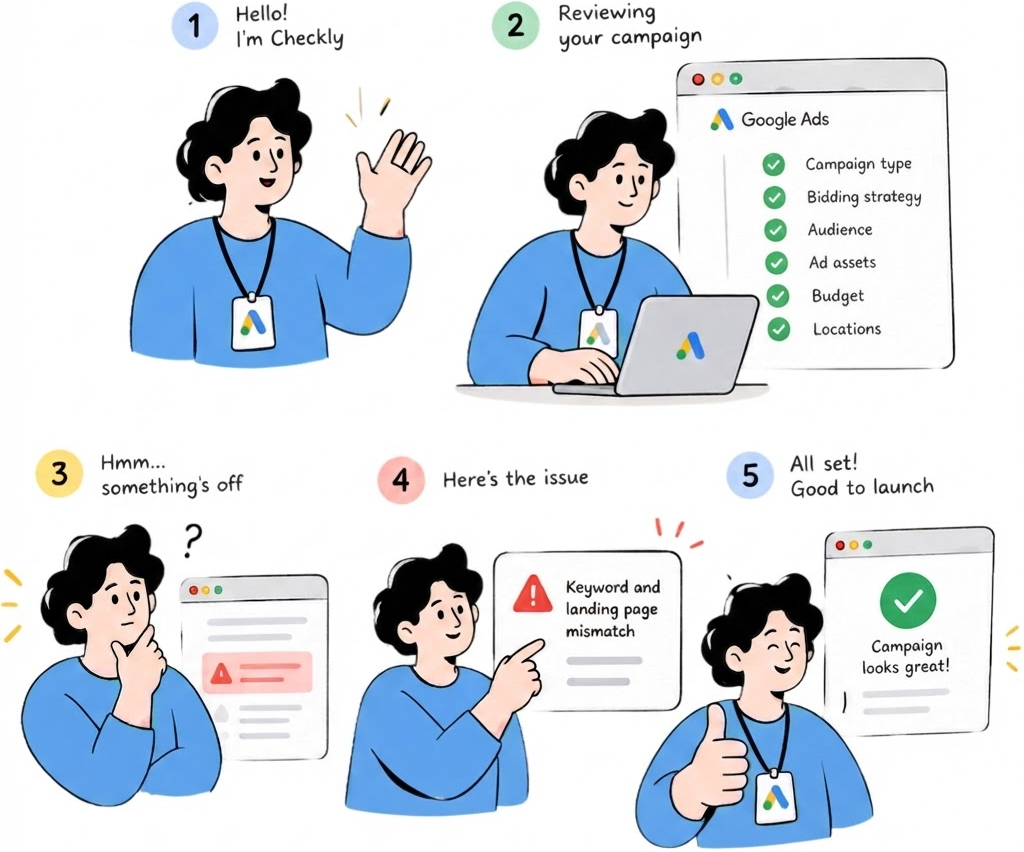
A lightweight review plugin turns the plan into a pre-launch check. It compares the plan with the live Google Ads setup, surfaces only meaningful mismatches, and explains what needs attention—so teams can launch with less manual checking and more confidence.
Plan-to-Setup Matching
Compare the original plan with the Google Ads setup automatically.
Human Control
Recommend actions without changing campaign settings automatically.
One-at-a-Time Review
Guide users through each mismatch individually to reduce review overload.
Flexible Plan Input
Let users paste text or bring in spreadsheet-style campaign
requirements easily.
Impact Clarity
Explain why a mismatch matters, not only which value is different.
Editable AI Interpretation
Let users review and correct what AI extracted before using it as the basis for comparison.
I mapped the current review process to understand where errors and 'noise' enter before a campaign goes live. From that, I defined where AI should intervene: first by comparing the plan with the live Google Ads setup, then by explaining only meaningful mismatches for human review.
Campaign Setup
Google Ads final settings
Mismatch Review
Impact + suggested action
Ask teammates
Ask others for double and
triple checks
Make Decisions
Edit, ignore, or continue
Where the plugin helps
Before
2
Under time pressure, planners switch repeatedly between spreadsheets, Google Ads, and teammates to confirm critical settings.
1
3
Managers already know how to build campaigns. The real friction appears during the final cross-check against the plan.
AI Comparison
Plan vs. setup field matching
Re-open plan for check
To compare setup and plan
Your Plan
Spreadsheet / pasted requirements



4
9
Match the plan
Match the plan
2
0
Need a check
Need a check
3
0
Does not match
Does not match


Setting
Setting
Media plan
Media plan
Your setup
Your setup
Status
Status
Budget type
Budget type
Total budget
Total budget
Total budget
Total budget

Budget amount
Budget amount
₩30M total
$22.2K total
$22.2K total
$22.2K total

Check
Locations
Locations
South Korea
South Korea
South Korea
Korea, U.S.

No match
Search partners
Search partners
Off
Off
On
Off
No match
Languages
Languages
Korean
Korean
Korean, English
Korean
Check
Ad schedule
Ad schedule
9AM - 10PM
9AM - 10PM
All day
9AM - 10PM
No match
Start date
Start date
Aug 1
Aug 1
Aug 1
Aug 1

Match
Match
Match
Match
Match
Match
Match
Match
Match
End date
End date
Aug 31
Aug 31
Aug 31
Aug 31
Match
Match
Conversion goal
Conversion goal
Purchase
Purchase
Purchase
Purchase
Match
Match
5 items left to review..
All Good to launch!


Update
Edit plan
Launch
Edit plan
X
X

AI is reviewing your plan...
.....
₩
Budget

Checking...
D
Dates
Checking...
KR
Locations

Queued
YT
Network
Queued
YT
Conversion goal
Queued
YT
Bid strategy
Queued
✦
This won’t take long
We’re running a few checks to help you launch with confidence.

AI


↓
↓
↓
↓
↓
↓
Yes
No
No issues
↓
Edit
Ignore
↓
↓
↓
Yes
Final Campaign Setup
Open Ad Review
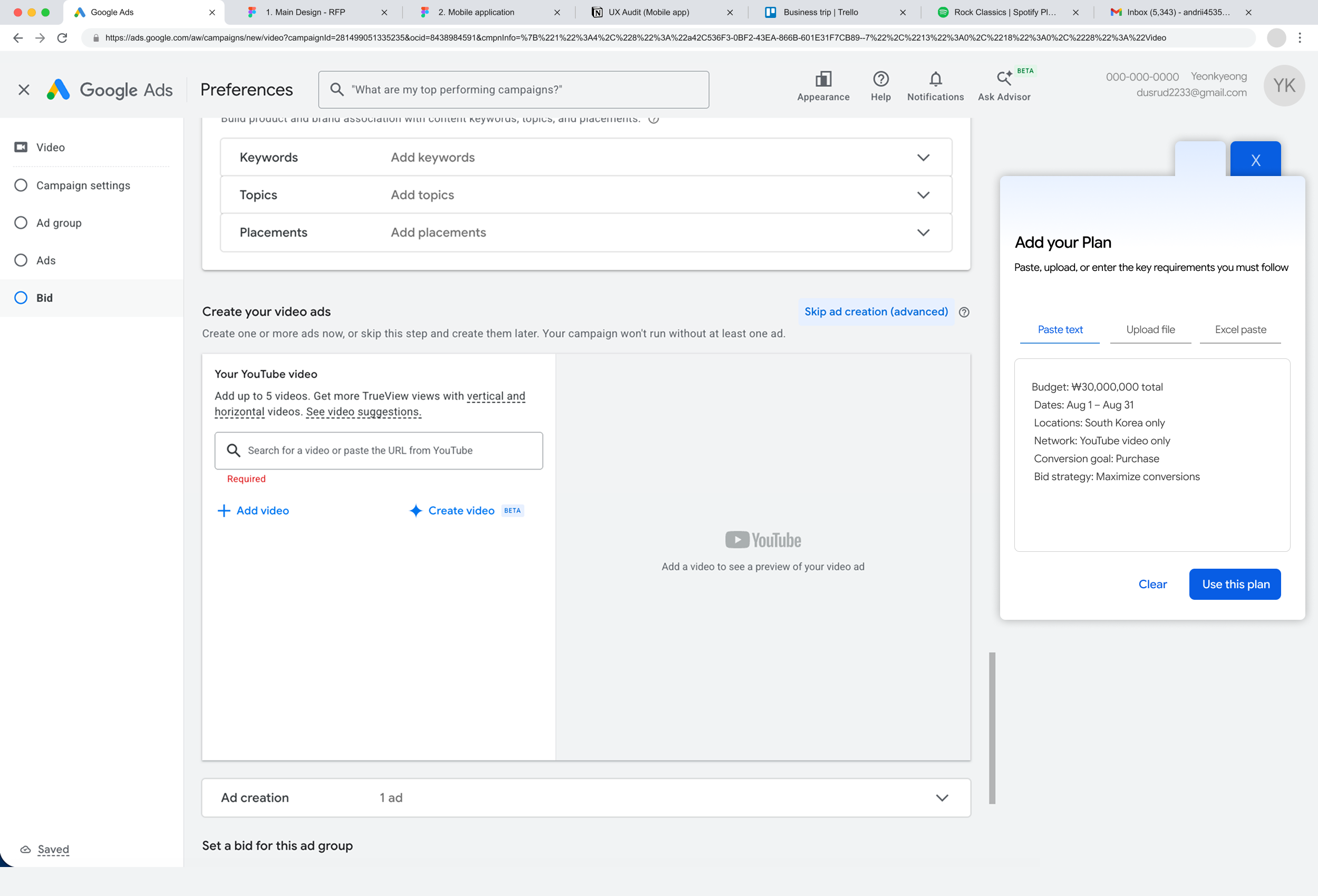
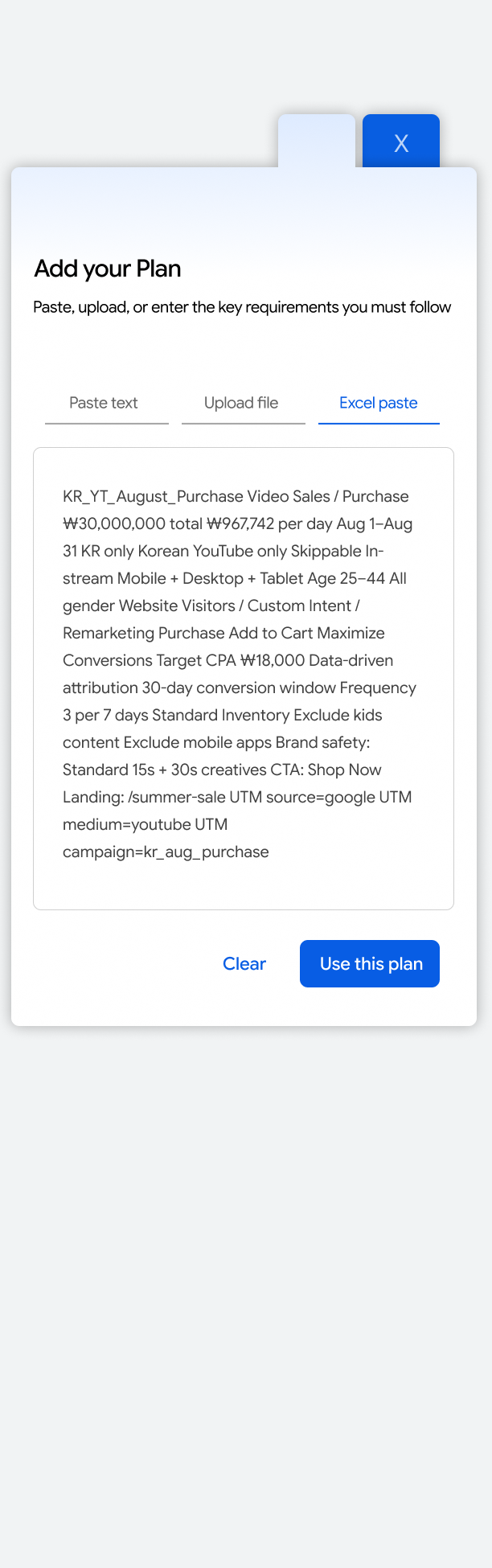
Add Plan
Paste text
Upload file
Excel paste
AI extracts key requirements
Compare with Google Ads setup
Mismatch found?
Review complete
Review complete
Show issues
How to respond?
Go to Google Ads setting
Edit setup
Re-run review
Final Review Summary
↓
Edit
Edit
Edit
Ignore
Review later
Review later
Review later
Ignore
Ignore
Show issue 1 of N
Next issue 1 of N
Next issue 1 of N
How to respond?
How to respond?
How to respond?
Final Review Summary
Ready to launch?
Return to Plan
Launch Campaign


Catch costly setup errors
before launch
Even after completing every setup step, users still second-guess their own work and feel anxious right up until launch.
The review starts from the plan—the source of truth—and compares it with the final Google Ads setup before anything goes live.
Users review one mismatch at a time, see its impact, and stay in control of every change.
Before — all results at once
The first concept summarized every mismatch in one dashboard. Users still had to scan the list, remember what to fix, move back into Google Ads, then rerun the review.
After — one issue at a time
The revised flow reduces review load by explaining one mismatch at a time, showing its likely impact, and letting users edit, defer, or continue before moving to the next issue.
1 Bring in the plan
After campaign setup, users can paste requirements, upload a file, or paste spreadsheet-style inputs without reformatting the plan.
2 Compare plan vs. setup
AI structures the input and compares each requirement with the current Google Ads settings, turning an external plan into a reviewable checklist.
3 Prioritize by severity

Green means the setup matches the plan. Amber highlights differences that need context. Red marks a confirmed mismatch that should be resolved before launch.
4 Resolve issues, then re-check
Users can act on each flagged item, update the Google Ads setup, and run the comparison again. Once every setting returns to green lights, users can move forward to launch.
1.Locations do not match Your Google Ads locations include markets not listed in the plan.
2.Campaign dates do not match Your campaign starts or ends outside the planned campaign period.
3.Conversion goal does not match Your selected conversion goal is different from the planned objective.
4.Bid strategy does not match Your bid strategy differs from the strategy specified in the plan.
Does Not Match
**Alert Examples
Need a Check
1.Market time zone does not match Your campaign schedule does not align with the market time zone.
2.Currency does not match Your account currency differs from the currency used in the plan.
Solo Project · AI-Assisted Review Plug-in for Google Ads
Independent concept · Not affiliated with or endorsed by Google
An independent concept inspired by 7 years of hands-on Google Ads experience.While double-checking critical settings under tight launch deadlines, I often wished for a tool that could catch mistakes before they wasted budget or impacted campaign performance.
Why I started this
Double Check before you publish
Issue-by-Issue review
Expected Impact (Not yet tested)
X
X

Review & Publish
Plan check complete
Publish
0
2
14
Does not match
Need a check
Match your plan
Your ads are ready to go live
All items have been reviewed or confirmed
Review Summary
Budget
₩1,000,000 / day
Locations
South Korea
Dates
Aug 1 - Aug 31
Reduce manual cross-checking
Automating the plan-to-setup comparison should reduce the time and attention spent reopening campaign settings and checking values line by line.
Increase launch confidence
Clear warnings could help users see what needs attention, understand why it matters, and decide what to change before launch.
Standardize pre-launch QA
A shared review process could help teams catch setup errors and rely less on one person’s experience.
Google Ads is Google’s paid advertising platform for running campaigns across YouTube video, Display, and other Google search. Marketers use it to decide where ads appear, who sees them, how much to spend, when campaigns run, and what counts as a conversion.
Manual Check
Outside tools
Last-minute doubt

Reflection
From Planning to Product Thinking
My performance marketing background helped me distinguish high-impact setup risks from noise and translate campaign logic into a focused product experience.
Keeping Users in Control
Automatic changes can affect campaign budgets. I kept the final decision with users so they can stay in control, even under time pressure.
Next Steps
Next, I would test how well the AI finds errors and whether the tool helps users feel more confident before launching real campaigns.
Validate with real campaign complexity
Test multi-market, multi-currency, and larger campaign structures while measuring review time, missed errors, and false positives.
Define confidence and escalation rules
Add clear handling for missing or ambiguous inputs, including when the AI should ask for clarification rather than produce a recommendation.
X
X

Locations do not match
Next
Your plan South Korea
Your Google Ads setting South Korea United States
Reviewing your plan...
1 of 3
Edit Location
Review later
Your ads may run outside the market listed in your plan
Plan Summary
AI

*Possible impact: wasted budget + irrelevant clicks

X
X

Market time zone might not match
Back
Next
Reviewing your plan...
2 of 3
Edit Set up
Ignore
Plan Summary
AI
*Possible impact: missed launch hours and off-pace spend
Starts and ends 16 hours late. Recommend to use a KST account
Your planAug 1 – Aug 31 KST
Your Google Ads setting Aug 1 – Aug 31 PST

X
X

Currency might not match
Next
Reviewing your plan...
3 of 3
Edit Set up
Ignore
Plan Summary
AI
*Possible impact: overspending or underspending
Your account currency differs from the currency used in your plan
Your plan₩30,000,000 total
($22,222.22 total)
Your Google Ads settingUSD (₩1,350 = $1)

Back
Solo project
Interaction Design
Plug-in design
AI-assisted UX
Source: Survey of agency staff, marketers, and ad operators | n=5


More projects

Bukchon Music Festival